Server side
You can find all source files of this example in the \FastReport\Demos\ClientServer\Server folder.
Components used in this demo: server component TfrxReportServer (Serv), database connection component TADOConnection and TfrxADOComponents, along with other add-on FastReport components.
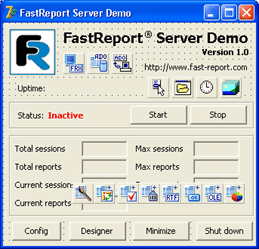
For the convenience of clients, data about configuration of the server is stored in a file, which is editable by the built-in editor.
File server.conf:
[Server]
; TCP/IP port for HTTP server
Port=80
; report session timeout in seconds
SessionTimeOut=600
; client connection timeout in seconds
SocketTimeOut=600
; index page filename
IndexFileName=index.html
; path to folder with logs
LogPath=.\logs\
; enable of log writing
WriteLogs=1
; maximum log files in history
MaxLogFles=5
; maximum log file size
MaxLogSize=1024
; path to folder with the reports (*.fr3)
ReportPath=.\reports\
; public document folder for documents and results
RootPath=.\htdocs\
; disable of the caching document by the web browser
NoCacheHeader=1
; GZIP compression enable
Compression=1
; MD5 message integrity check
MIC=1
; user login
Login=
; user password
Password=

[ReportsCache]
; enable caching of the reports with same params
Enabled=1
; path to chache folder
CachePath=.\cache\
; dafault delay for cache of the report results in seconds
DefaultLatency=300

[ReportsLatency]
; cache delay for the 1.fr3 report in seconds
1.fr3=10
; cache delay for the 1.fr3 report in seconds
2.fr3=20
; add below the any reports for the custom cache delay setup
Fields of the configuration file correspond to field names of the TfrxReportServer.Configuration property.
The "allow.conf" and "deny.conf" files contain lines with allowed and restricted addresses respectively.
Database file is stored in the "\database" folder.
In the main module, the constants with names of configuration files are defined:
const
  CONFIG_FILE = 'server.conf';
  ALLOW_FILE = 'allow.conf';
  DENY_FILE = 'deny.conf';
After program starts, the database is connected via the MicrosoftJet OLE DB interface.
In variables ConfFile, AllowFile, DenyFile we a store path to configuration files:
AppPath := ExtractFilePath(Application.ExeName);
ConfFile := AppPath + CONFIG_FILE;
AllowFile := AppPath + ALLOW_FILE;
DenyFile := AppPath + DENY_FILE;
Load config files to the Serv component:
Serv.Configuration.LoadFromFile(ConfFile);
Serv.AllowIP.LoadFromFile(AllowFile);
Serv.DenyIP.LoadFromFile(DenyFile);
Execute the server:
Serv.Open;
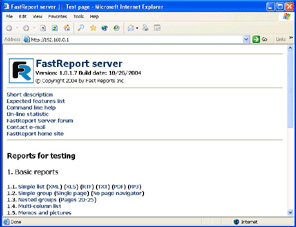
After all work is done, you are ready to use a powerful report server. Launch the any web browser and type http://127.0.0.1 in address line
 {width="296" height="227"}
You can design reports with the help of the internal FastReport designer:
OpenDialog1.InitialDir := Serv.Configuration.ReportPath;
if OpenDialog1.Execute then
begin
  frReport1 := TfrxReport.Create(nil);
  frReport1.LoadFromFile(OpenDialog1.FileName);
  frReport1.DesignReport;
  frReport1.Free;
end;